React v19
Posted on: 13/06/2026(updated)
🚀 React Server Components
In this new version, we can create components that run exclusively on the server. This allows us to perform operations that were previously impossible in standard React, such as writing database queries directly inside our React components.
Example: Fetching Data on the Server
import db from 'mongo-db';

async function Homepage() {
  const link = db.connect(
            'localhost', 'root', 'passw0rd');
  const data = await db.query(link,
            'SELECT * FROM products');

  return (
    <>
      <h1>Trending Products</h1>
      {data.map((item) => (
        <article key={item.id}>
          <h2>{item.title}</h2>
          <p>{item.description}</p>
        </article>
      ))}
    </>
  );
}

export default Homepage;
This is not something you would expect to see in React. Functional components couldn't be asynchronous, and we weren't allowed to have side-effects directly inside the render like that. But the key thing to understand here is that Server Components never re-render. They run once on the server to generate the UI, and their rendered UI is sent to the client. As far as React is concerned, this output is immutable and will never change.
We can't use state because state changes, and Server Components can't re-render. We also can't use useEffect because effects only run after the render on the client, and Server Components never make it to the client.
This also means that unlike traditional React components—where we have to put side-effects inside a useEffect callback or an event handler so that they don't repeat on every render—with Server Components we no longer have to, since they only run once.
To make it a bit more confusing, it should be noted that traditional React components (or Client Components) render on both the client and the server, and React Server Components are not a replacement for Server-Side Rendering.
🥦 Specifying Client Components
In this new version, all components are assumed to be Server Components by default, so we add the "use client" directive.
'use client';

import React from 'react';

function Counter() {
  const [count, setCount] = React.useState(0);

  return (
    <button onClick={() => setCount(count + 1)}>
      Current value: {count}
    </button>
  );
}

export default Counter;
🦚 Client Boundaries
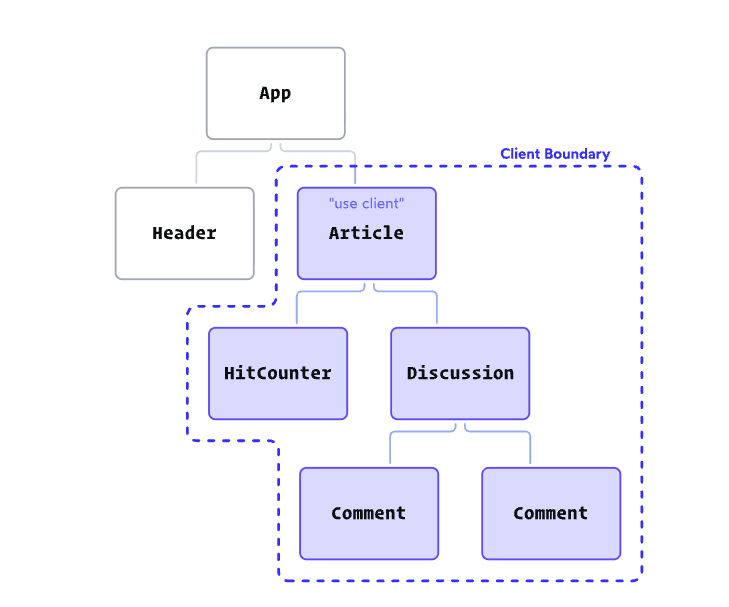
Let's say we have an Article component with a "use client" directive, and a child component HitCounter that updates the counter when Article re-renders. For this, React has added a rule that Client Components can only import other Client Components.
When we add the "use client" directive to the Article component, we create a "client boundary". All of the components within the boundary are implicitly converted to Client Components, even when they don't have the "use client" directive themselves. They will still hydrate and render on the client in this particular situation. So we don't have to add "use client" to every single file that needs to run on the client.
🗒 What if I need to use state high up in the application?
'use client';

import React from 'react';
import { DARK_COLORS, LIGHT_COLORS } from '@/constants.js';

import Header from './Header';
import MainContent from './MainContent';

function Homepage() {
  const [colorTheme, setColorTheme] = React.useState('light');

  const colorVariables = colorTheme === 'light'
    ? LIGHT_COLORS
    : DARK_COLORS;

  return (
    <body style={colorVariables}>
      <Header />
      <MainContent />
    </body>
  );
}
In this setup, we need to use React state to allow users to switch between dark and light mode. To avoid making all of our components Client Components, we can always extract the code and turn it into its own component wrapper.
// /components/Homepage.js
import Header from './Header';
import MainContent from './MainContent';
import ColorProvider from './ColorProvider';

function Homepage() {
  return (
    <ColorProvider>
      <Header />
      <MainContent />
    </ColorProvider>
  );
}

export default Homepage;
And remove the "use client" directive from that page.